The Lab
Every listing on this site goes through the same bench before it is published: typed into a modern editor, checked line by line, turned into a real Commodore program and run in an emulator. This page describes that bench. It is a work in progress, and every change lands on GitHub.
ON THE BENCH
- Editor
- Visual Studio Code
- Emulator
- VICE 3.10, x64sc
- Tokenizer
- petcat (ships with VICE)
- Glue
- Python 3.9+, no extra packages
- Host
- Windows
From listing to READY.
A listing starts life as a plain text file, ZARIA.bas for example. Saving it sets off five steps:
- .basThe listing, typed in VS Code with C64 BASIC syntax colours.
- c64.pyChecks every line and writes a clean copy for the tokenizer.
- petcat -w2Turns BASIC V2 text into tokens, exactly as the C64 stores them.
- .prgA real program file, checked for the $0801 load address.
- x64scVICE starts, loads and runs it on its own.
In VS Code this is one keystroke: Ctrl + Shift + B builds and runs the file that is open. There is also a watcher: leave it running and every save of a .bas file in programs builds and launches it automatically.
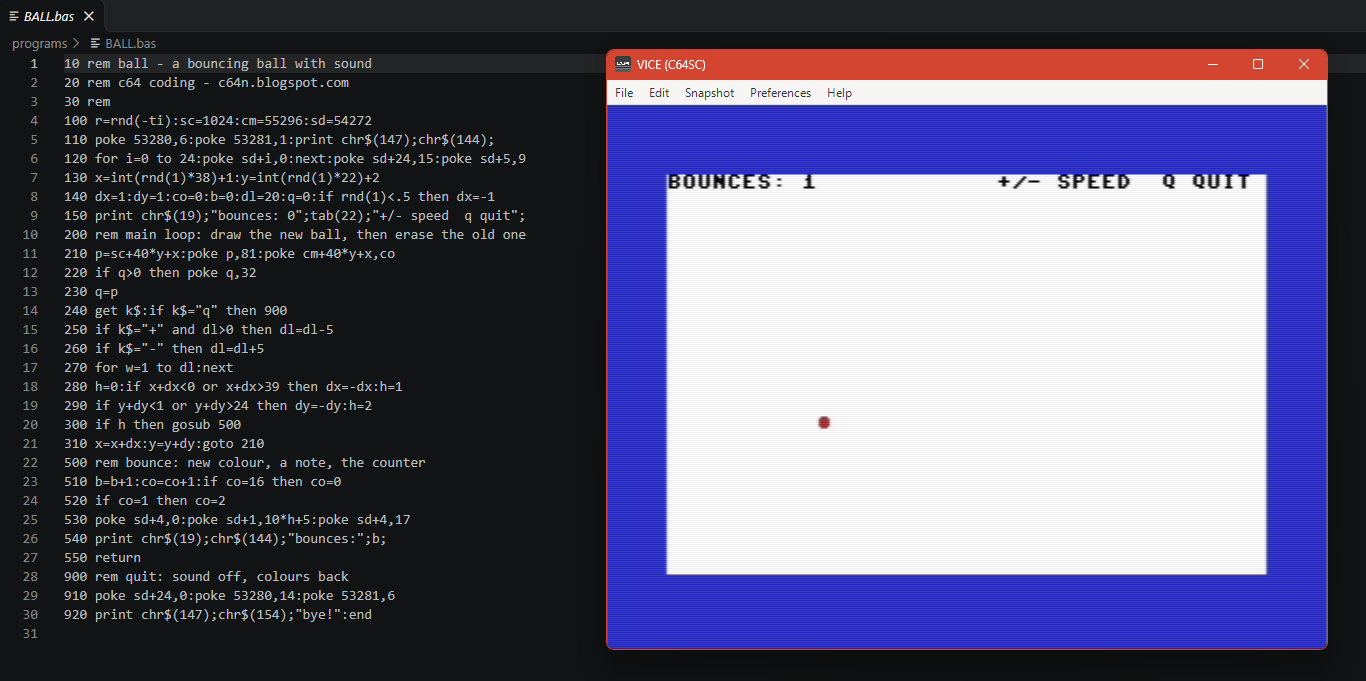 |
| The bench: BALL.bas in VS Code on the left, the program running in VICE on the right. |
What gets checked
Typing errors are the enemy of every type-in. The build catches the mechanical ones before the C64 ever sees the program:
- Every line starts with a line number between 0 and 63999.
- No line number appears twice.
- Every quote is closed.
- Only plain ASCII: Greek letters and smart quotes from a word processor are rejected.
- Commands from other BASICs, such as
CLSandCLEAR, raise a warning. - The finished .PRG must start at $0801 and its first keyword must really be tokenized.
- If a build fails, the old .PRG is deleted, so a stale program can never be launched by mistake.
Problems are reported in the same format as a compiler, so VS Code lists them in its Problems panel and jumps to the line:
D:\c64-coding\lab\programs\ZARIA.bas(54): error: Unterminated quoted string.
D:\c64-coding\lab\programs\ZARIA.bas(1): error: 1 source validation error(s)
Runtime errors such as ?SYNTAX ERROR or ?BAD SUBSCRIPT still happen where they always did: on the Commodore, after you type RUN.
Upper case, lower case, PETSCII
The C64 does not use ASCII. In its default mode, what a PC calls lower-case letters appear on screen as capitals, and the shifted letters become graphic symbols. That is why the listings here are stored in lower case: type them on a real machine without touching SHIFT and you get exactly what the listing shows.
The lab leans on the same rule. c64.py lowers every letter before handing the file to petcat, including text inside quotes, so PRINT "HELLO" shows HELLO in capitals. The original .bas file is never changed. Mixed-case text and special PETSCII symbols are written as CHR$() codes, which keeps the listing readable and the result predictable.
No Greek on a Commodore: the character set simply doesn't have it. Greek programs of the era used Greeklish, Greek written in Latin letters, and so do the listings here.
No lab? No problem
You don't need any of this to try a program. Every listing on the site has a ↓ .PRG button that builds the program in your browser, following the same tokenizing rules as the C64's own ROM. For the Bouncing Ball, the browser's file and the one petcat builds in the lab are identical, byte for byte. Drop the file on a VICE window and it runs. Click the lines of a listing as you type them and the page remembers where you stopped.
Get the lab
The whole bench is on GitHub, together with the source and the .PRG of every listing published here:
c64-coding/
  lab/                 the bench: VS Code tasks, c64.py, watcher, syntax colours
    programs/          your .bas files; the .prg is built next to each one
    tools/c64.py       checks, petcat, VICE launcher, watcher
    vscode-extension/  C64 BASIC V2 syntax highlighting
  listings/            one folder per article: .bas, .prg, screenshot
  blogger/             this site's theme, pages and posts
To set it up on Windows:
- Install VICE and Python 3.9 or newer.
- Download or clone the repository and open the
labfolder in VS Code. - If VICE is not in
D:\GTK3VICE-3.10-win64\bin, changeVICE_BINinrun-c64.batandwatch-c64.bat. - Open
programs\HELLO.basand press Ctrl + Shift + B.
If VICE opens and the C64 counts to ten, the bench is ready. Type in a listing, save, and watch it run.
Comments
Post a Comment